Thursday, 29 August 2013

24 Android App Store Alternatives for Google Play

By on 8/29/2013 10:18:00 pm

When you hear of android apps, what comes to mind? Well, if all you can think about is the ‘Play Store’ icon on your smartphone home screen, you are way too restricting. Borrowing from statistics, the official android marketplace is the leading ever hub where android users get the applications they need. But there are many Android app store alternatives where you can get a wide range of similar applications for your android phone, tablet PC or phablet. Indeed, you might even be able to come across unique apps that you wouldn’t otherwise find on the Google Play Store. Not all android developers are willing to pay an annual fee to Google Play store to list their apps, so they might as well opt to upload them in alternative stores. To install apps from third party app stores on your you need to configure your android device appropriately by enabling ‘Unknown Sources’ under Settings

In the following post, we roam around the World Wide Web and bring you a list of the top 25 android app store alternatives:

1. Amazon.com: Appstore for Android

Amazon app store is a favorite app store for scores of android users. Amazon introduces offers to the paid apps, which makes the process of acquiring a paid app just better! Amazon also gives one paid app for free in a day. Moreover, Amazon offers paid apps at discount rates. Many useful and unique applications are categorized under different topics and you can use the test drive feature which helps you try out apps using the browser before you actually buy.

2. Slide ME

Slide ME, with a global reach of decent android users, is another place you can get a collection of great apps from talented developers on the platform. Slide ME offers free and premium apps in various categories. To ensure that you only get high quality apps, each application submission has to go through a quality control process before it’s listed on the platform. Slide ME supports a number of payment options, including PayPal, and it’s also easy to filter your searches in such a way as to find good app results from the descriptions. The next time you need an app to do anything, visit the Slide ME android app store and see what they’ve got for you there.

3. Apps Zoom

Appszoom has been recognized as the best android app review website by about.com.  Apps Zoom lists most of the famous apps available in the Google play as well as unique useful android apps. They have hundreds, if not thousands, of cool apps listed for sale. They also help you whenever you need to hire an android developer. You can filter app search to “Top apps” to list all the famous apps available in this website.

4. Cnet

CNet download is a famously known software download website. CNet offers several android apps with comprehensive CNET user reviews. They also display their apps with full descriptions, which is highly useful to all users as they can get an insight before they actually download their applications of choice. All apps in this website are checked for malware, so you need not panic when downloading application from this store.

5. F-Droid

F-Droid is another great android applications platform that has a separate application to list all their android apps. This application can be downloaded from their website. One cool advantage of the apps listed in this website is that they are free, and feature no tracking or ads.

6. Aptoide

Aptoide is a famous android apps store where you can upload and invite users to download and experience your app. Lot of new developers upload their applications on this platform.

7. AppsLib

 Appslib claims that more than 38,000 of their apps have been installed in android tablets as on Q1, 2013. They have apps both for mobile and tablets PCs. This app provides an easy, convenient way for android app developers to list their applications.

8. Yandex

Yandex features more than 50,000 apps as of Q1, 2013. All apps listed on their platform are checked using for malwares using the Kaspersky Anti-Virus, hence you are unlikely to host a malware on your android smartphone.

9. 91 mobile

91 Mobiles lists scores of useful applications. Their featured app lists are widely downloaded by thousands of android users. As it is, most of the apps listed on this platform will be useful for students.

10. Mobango

Mabango lists more than 100k apps in different categories developed by 40k developers. More than 8 million users download millions of apps from this platform every year. Well, if you are looking for a giant house featuring some of your favorite applications, you should probably check out this platform.

11. Pandaapp

Pandaapp feature android app downloads, easily and conveniently. More importantly, all their app listings are free so if you are looking to populate your android tablet PC or smartphone with interesting stuff without having to deep your hands in your pocket, this is one good place to get started looking. However, you should make a point of carefully reading the reviews before you actually download anything. You want to make sure that you are downloading the right applications for your android smartphone, not a masqueraded malware.

12. Baidu App Store

Baidu ranks 5th on the Forbes World’s Most Innovative Companies List. Baidu is a Chinese search giant that also features an app store for android users. These apps are listed from their own making and also from collections on other websites as well. You can find lot of unique and useful apps for android here.

13. Tencent App Gem

Just like Baidu, Tencent is also a search engine. Tencent allows users to download apps directly from their website and also from their custom made app. They have apps both for android mobile phones and tablets. If you own an android tablet, don’t miss out on this one.

14. Opera Mobile App Store

Opera mobile store has many useful and unique applications that you might want to have on your android gadget. The Opera app store claims that all their applications are safe and tested. Well, they offer a wide number of android applications falling within different categories. If you are looking for a good discount the next time you are purchasing an android application, be sure to consider this store.

15. MIUI.com

MIUI refers to the Xiaomi OS. They have their own website where users can download from a greate variety of android apps. Many of their apps are unique and useful. They also offer numerous tips and tricks on android’s common issues.

16. GetJar

GetJar offer you to choose from a huge variety of android apps. They also offer a lot of unique hacking apps that are developed by budding coders. This apps store has more than 5 million android app developers registered.

17. AppChina

The AppChina database is another good place where you might want to dig out for those apps you can’t easily find anywhere else. Well, they get their funding (as much as 6 million dollars) from happy sponsors, who keep their community of developers motivated and productive.

18. Handango

Handango is yet another famous sore where you can get both free and discount apps. The suitability of this apps store can be only likened to the Google Play store. Visit them and check out what they have on their apps menu.

19. D.cn Games Center

D.cn Games Center features collections of games apps, some of which may also be found in the Google play store. Most of their apps are free but advertisement supported. If you are a gaming freak, this is the one place you ought to check out.

20. Insyde Market

Insyde Market feature an amazing collection of fascinating apps.

21. Gfan

Initially Gfan was a forum website used to share user’s experience on apps, queries and hacks related to android applications. However, after the platform become more popular, they upgraded it to an android apps store.

22. YAAM Marke

YAAM is a simple website facility that features scores of useful android apps.  Their apps are listed as both free and paid.

23. Taobao App Market

Taobao recently entered into the android app market and already the’ve got a good number of users visiting and downloading apps listed on their website. They use their own unique payment method named Alipay.

24. Google Chrome

You might have been surprised to see Google chrome appear in this list. Yes, you can android apps using Google chrome. Simply go to the Google webstore and download the extension APK Downloader. Using this extension, you may download android apps to your PC and then install them in your mobile device.

25. Blackmart

Blackmart is a good alternative for Google play.

26. Monbo market

Mobo market is new apps store good alternative for Google play

Monday, 26 August 2013

Micromax A240 CanvaS DOODLE2 Specification

By on 8/26/2013 10:08:00 pm


Big & beautiful 14.47cm (5.7) HD IPS Screen!

Bring your vivid imagination to the real world on a beautiful 14.47(5.7) HD IPS screen. Dive into a world of lines, colors and all the fun you can imagine on a crystal clear 1280x720 pixel screen!


Full Aluminum Body!

Canvas Doodle 2 has a full aluminum body that always keeps your canvas in style! Keep your Canvas in fashion with the complimentary cover and doodle your heart away with a sleek Stylus!


All the fun, on the run!

Carry your music library, movies, images, doodles, sketches & more in the 16GB internal storage! Make every moment fun with endless entertainment on the Canvas Doodle 2!


Ready to rumble!

The Canvas Doodle 2 comes bundled with a handy stylus that lets you doodle with ease. Keep your Canvas safe with its innovative flip-cover that doubles up as a kickstand which lets you use the phone, sideways!


M!Doodle + Evernote App!

Doodle your chats & animate your conversations with M!Doodle. Scribble smiley faces, draw doodle text or sketch over clicked images! Doodle all your conversations & make messaging even more fun with M!Doodle that lets you create & send Doodles to all your friends regardless of what phone they use!


Capture moments that inspire!

Click and capture images in vivid clarity with its 12MP Auto-focus camera and lighten up every moment with its LED flash. Click profile pics for Facebook with the 5MP front camera and put a face to all your video chats with its FF camera!


Vertical and Horizontal panorama!

Go bottoms up on the action with the panorama feature that lets you shoot images from the bottom, straight to the top or left to right!


The power of imagination!

Revv up your creativity with the 1.2 GHz Quad Core Processor. Draw your imagination or discover rich infotainment on the web. Power all your applications with a 1.2GHz processor that packs massive muscle underneath the hood!


Smart Gestures
Just flip over your phone upside-down to put your call on silent or to put your active call on speaker! All you need to do is, flip! Additionally, by bringing the phone close to your ear you can answer an incoming call or dial a selected contact.


Look away to pause the action!

Don't miss a moment of the action with the 'look away' feature that pauses the video being played as soon as you look away from the screen.


Blow to Unlock!

Just blow air on your screen to unlock your phone! Tap M!Unlock to activate the "Blow/Shake to unlock" feature


Video/Browser Pinning

Do two things at once by pinning your browser on half the screen & utilizing the other half for any application! You can even pin a video on to the screen to multi-task while watching a video. Pinning a video will let you access any application in the background, while the video keeps playing!


Jelly Bean 4.2 + FOTA

Experience the versatality of the Android platform with the pre-loaded Jellybean 4.2 OS! Discover rich apps, movies, music, videos & more at the Google Play Store. Get ease of use with FOTA (Firmware over the air) which allows you to wirelessly download firmware updates directly to your phone.


Keep calm & stay connected!

Transfer files easily with its USB 2.0, share files with friends or talk hands free, all through its Bluetooth 4.0 connectivity. Surf the web faster through Wi-Fi. Live life in the fast lane with its superior 3G connectivity, capable of 42Mbps HSDPA download speeds and 11Mbps HSUPA upload speeds. Connect to your world, anytime anywhere with the endless connectivity options on the Canvas Doodle 2.


Ready for action?

The Canvas Doodle 2 comes pre-loaded with M!Live, MusicHub, M!Security, Spuul, Hike Messaging, Opera Mini, M!Live. Game Hub, Kingsoft office suit & the list goes on!

Sunday, 25 August 2013

The Highest Earning Website Of This Year

By on 8/25/2013 10:29:00 am

Online Market is one of the most famous method to make money. All the website owner's dream is to take their site into top and earn some money through it. In this list, today we will see the top 30 websites which has earned the most money in 2013. In this top 30 ranking, Google has ranked #1 most money earning website of 2012 and Amazon and Yahoo ranked in next 2nd, 3rd positions.
Here Top 30 Websites.
1. Google
Founders : Larry Page and Sergey Brin
Income per sec :$691.29
Average income of the year :$22,000,000,000
2. Amazon
Founders : Jeff Bezos
Income per sec :$607.05
Average income of the year :$19,200,000,000
3. Yahoo
Founders : Jerry Yang and David Filo
Income per sec :$228.31
Average income of the year :$7,200,000,000
4. eBay
Founders : Pierre Omidyar
Income per sec :$199.45
Average income of the year :$ 6,300,000,000
5. Msn/Live
Founders : Nathan Myhvoid
Income per sec :$102.00
Average income of the year :$ 3,200,000,000
6. Paypal
Founders : Luke Nosek, Max Levchin and Peter Thiel
Income per sec :$71.40
Average income of the year :$2,250,000,000
7. iTunes
Founders : Jeff Robin
Income per sec :$60.00
Average income of the year :$1,900,000,000
8. Rueters
Founders : Marshal Vace
Income per sec :$60.00
Average income of the year :$1,900,000,000
9. Priceline
Founders : Jesse Fink
Income per sec :$59.6
Average income of the year :$1,850,000,000
10. Expedia
Founders : Added Mark Schroeder
Income per sec :$46.00
Average income of the year :$1,450,000,000
11. NetFlix
Founders : Reed Hastings
Income per sec :$38.00
Average income of the year :$1.100.000,000
12. Travelocity
Founders : Terry Jones
Income per sec :$38.00
Average income of the year :$1.100.000,000
13. Zappos
Founders : Nick Swinmurn
Income per sec :$31.70
Average income of the year :$1,000,000,000
14. Hotels.com
Founders : David Litman
Income per sec :$31.70
Average income of the year :$1,000,000,000
15. AOL
Founders : Erik Prince
Income per sec :$30.50
Average income of the year :$960,000,000
16. Orbitz
Founders : Jeff Katz
Income per sec :$28.00
Average income of the year :$870,000,000
17. Overstock
Founders : Robert Brazell
Income per sec :$27.00
Average income of the year $834,000,000
18. Myspace
Founders : Tom Anderson
Income per sec :$25.00
Average income of the year $800.000.000
19. Skype
Founders : Niklas Zennstrom
Income per sec :$18.00
Average income of the year : $550,840,000
20. Sohu
Founders : Zhang Chaoyang
Income per sec :$14.00
Average income of the year: $430,000,000
21. Buy.com
Founders : Robb Brock
Income per sec :$12.68
Average income of the year : $400,000,000
22. StubHub
Founders : Eric Baker
Income per sec : $13.00
Average income of the year : $ 430,000,000
23. Alibaba
Founders : Jack Ma
Income per sec : $10.00
Average income of the year: $315,000,000
24. Facebook
Founders : Mark Zuckerberg
Income per sec :$9.50
Average income of the year : $300,000,000
25. YouTube
Founders : Chad Hurley, Jawed Karim and Steve Chen
Income per sec :$9.50
Average income of the year : $300,000,000
26. Blue Nile
Founders : Mark Vadon
Income per sec :$9.40
Average income of the year: $295,000,000
27. Tripadvisor
Founders : Stephen Kaufer
Income per sec :$8.20
Average income of the year : $ 250,000,000
28. Getty Images
Founders : Mark Getty
Income per sec :$7.40
Average income of the year : $230,000,000
29. Bidz
Founders : Garry Itkin
Income per sec :$6.70
Average income of the year : $200,000,000
30. NYTimes
Founders : Henry Jarvis Raymond
Income per sec :$6.00
Average income of the year : $175,000,000 

[ROM] {NEW} MicroFire v3.2 | SMAiL UI | New UPDATE [05/08/13]

By on 8/25/2013 01:19:00 am


SMAiL UI :
what is SMAiL UI ?
its mainly taken some resources (images) from MiUI and LeWa ROM... But its completely different from those... based on Stock ROM... so it has awesome looks with performance friendly ... SMAiL UI mainly targeted on user friendliness, for example resents panel inMicroFire is more useful then any other... also mods like volume rocker to skip songs is must have mods.... it also customizible... some want transparency in status bar, while some one like me don't... its good for both, switch between them any time.. SMAiL UI have eye candy theme which all love... i will also provide other themes later... enjoy ROM, keep SMAiLing

Features :
* MicroFired Lockscreen (BB10 style) 
* MicroFired Sense 3D recent apps
* MicroFired status bar
* MicroFired Settings
* 30 step volume Mod (more accurate volume)
* Added xposed Framework with dip option
* Scrolling Cache mod for faster scrolling 
* optimized Governor tweaks added 
* Removed auto Media scanning 

New | Added 23/05/13
* Vibrate when call end, busy, etc ( as many users requested )
* Digital clock with seconds for status bar
* Removed boltware
* Exposed apps added
* Aroma Installer
* Data speed indicator
* Fixed status bar icons
* New toggles
* Lockscreen BB while gradient fix
* Settings apk fix
* Updated hosts ( no more ads )
* OG battery Mod ( Change battery icon without reboot )
* Much More check out yourself.... 

NOTE:
* I take no credits for xposed apps & OG battry mod its done by this guy and this guy....
* I will never add xperia launcher,album,s4 launcher, ac!d mod,walkman,viper,xx,xx..... etc all that things... 
because its not done by me... and its nothing to do with ROM... if want just search in XDA, download, thank them... 
so dont ask me to add...
* You can request any mod you want, i try my best to do it...
 

Steps:
* Download zip
* Place it in SD
* Wipe all
* Install from SD
* Reboot

N.B-(this is not full version ROM.please install when other Rom is installed)


Dev-host link :


SCREENSHOTS :


V3.1 screenshots


Default Add ons


* GPS & SUPERUSER FIX :
Flash this > ZIP
Goto Settings > Engineer mode, location tab > YGPS, Information tab ,press AGPS Restart wait till it fix... Then again press AGPS restart.. for faster fix and done..

* Updated Superuser


* No seconds & data speed :
Flash this > ZIP
If you want to retrieve back just replace systemui.apk from ROM... 


PERFORMANCE :
* Use init.d supported boot.img or any app to add init.d support, governor tweaks only work if you have init.d support

* Head to settings > battery > uncheck reduce CPU... l feel the difference.....

* Decrease animation or turn it off in settings > developer options >animations....

* Small fonts looks good for phablet, check in Display > font size > small

HOW TO SETUP XPOSED FRAMEWORK :

Control Your Device with a Wave with Air Swiper

By on 8/25/2013 12:28:00 am


Control Your Device with a Wave with Air Swiper
Gesture-based controls are something that certain manufacturers have made noise about for a while now and continue to do so, as demonstrated by some of the features of the much anticipated Moto X.Independent developers have also been making the most of the possibilities presented by the proximity sensors and accelerometers in nearly all modern devices.  There are any number of reasons why you might want to be able to access a certain function of your device without actually touching it, and thanks to applications such as Air Swiper by XDA Forum Memberhelmanss, you can.
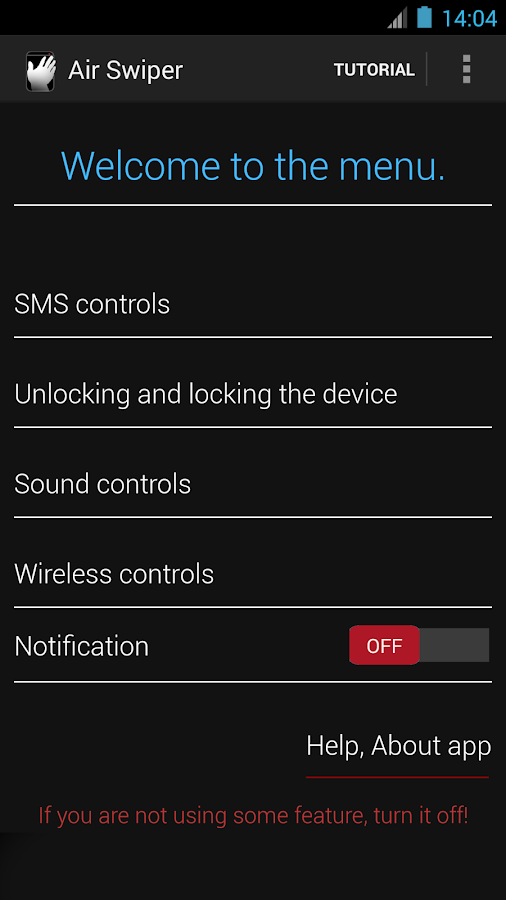
The app, as the name suggests, allows you to perform certain actions by simply swiping (or hovering) your hand above the proximity sensor of your device. Never again will you have to wipe the bacon grease from your grubby digits to check that important text message. The application currently allows you to perform functions such as locking or unlocking the device, switching between ringer, vibrate, and silent modes, toggling WiFi and Bluetooth and, as previously mentioned, opening the SMS application. This is all accessible with just a simple gesture.
The application was recently updated to fix a number of bugs that were discovered after feedback on the initial version, and also to fine tune some of the required gestures. The app does seem to have mixed results for different devices and ROMs. However. this is one definitely worth trying. While you’re at it, be sure to offer some feedback to the developer. Compatible with Android 4.0 and above, Air Swiper can be found in the application thread.


Description
This application allows you to work more effectively and faster with your phone. It makes your life easier as well as using your smartphone. It is very useful, when you have got dirty hands or you are in a car.
Features:
-Unlocking and locking the device & disabling a lockscreen
-SMS controls
-Sound controls
-Toast message on new SMS received.
-After boot application will turn on or off everything you have had selected before in the application.
-Wireless controls - Bluetooth, Wi-Fi, can be now turned OFF or ON by simple motions.
-Turn off lockscreen by swiping over your device sensor.
-Turn on device screen by swiping over the device sensor.
-Notification in statusbar
-Uninstall button
-Game mode - Turn on when playing games or using applications which needs proximity sensor.
You can read more in the application.
Developer do not have any liability for any damages caused by application. You are using it at your own risk.
Developer do not have any liability for any damages caused by improper operation.
Please, use all features with reasonably.
Never use the application while driving! Always pay attention to the traffic and health of yours and others!
Uninstall instructions:
Go to the main layout of the application scroll down now you see uninstall button, click on it. Click on OK in the dialog. The application will uninstall.
Please everybody who was having problems with uninstalling update your ratings. Thank you!

What's New
Version 3.0.3:
-New button for uninstalling the application in main layout !!
-New icons for switches.
-Fixed the bug with changing the sound profiles and dragging the status bar.
-Hopefully fixed the unlocking screen motion problem.
-HTC One now seems to be working.
-Game mode included. If you are playing games enable it to stop motions.

Some screenies:
                

Hope that someone will find it useful! I find it useful when I've got dirty hands or I am in a car! Please, always pay attention to the traffic in the car!!

Comment, rate, tell me what you think about it I will really appreciate it.


Actual version: 3.0.3.